Restarting Explorer instead of rebooting makes sense when other work is still open. A reminder to finish file transfers before running that command would help, since Explorer may still be handling those operations.
You’re so awesome! I don’t believe I have read a single thing like that before. So great to find someone with some original thoughts on this topic. Really.. thank you for starting this up. This website is something that is needed on the internet, someone with a little originality!
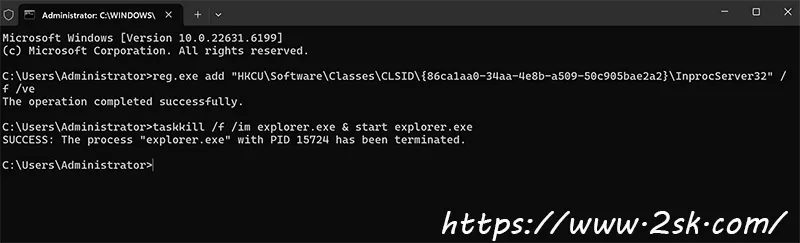








Restarting Explorer instead of rebooting makes sense when other work is still open. A reminder to finish file transfers before running that command would help, since Explorer may still be handling those operations.
You’re so awesome! I don’t believe I have read a single thing like that before. So great to find someone with some original thoughts on this topic. Really.. thank you for starting this up. This website is something that is needed on the internet, someone with a little originality!
I really like reading through a post that can make men and women think. Also, thank you for allowing me to comment!
I appreciate you sharing this blog post. Thanks Again. Cool.